
An LMS assigns training, delivers it, records completion, and produces evidence on demand. For UK organisations under HSE, CQC, Ofsted, FCA or ICO scrutiny, that evidence trail is the business case — not the feature list.
What a Learning Management System Does
A learning management system assigns training to people, delivers it, records who completed what, and produces evidence of all three on demand.
The evidence part is what you're actually paying for. A shared drive can host a course. It can't tell you that Sarah in accounts completed GDPR training on 14 March, scored 80% on the assessment, and is due a refresher in eleven months. It certainly can't produce that for 200 staff in a format an inspector will accept.
The course library, the authoring tools, the gamification and the AI recommendations all sit on top of that record. Buyers who shortlist on feature count end up with a decision they can't defend at the first audit. The more useful question is what evidence the system produces and how fast you can get it out.
An LMS is a compliance record with a course player attached. For UK organisations under HSE, CQC, Ofsted, FCA or ICO scrutiny, that is the business case.
LMS, LXP or Training Management Software?
Three categories get used interchangeably and shouldn't be.
An LMS is administrator-driven learning delivery. You decide who must complete what by when, and the system assigns, tracks and records e-learning and assessments. Compliance training, onboarding, mandatory refreshers. The organisation pushes; the learner completes; the record is the point.
An LXP, or learning experience platform, is learner-driven. It surfaces content people might want, recommends pathways, and optimises for engagement and discovery. Excellent for professional development in organisations that already have a learning culture. Poor at answering "prove everyone did their fire safety training" because it was never designed to compel anything. For a deeper comparison, see LMS vs LXP for UK SMBs.
Training management software (a TMS, sometimes called a TMIS — Training Management Information System) manages the wider operation around training: instructor-led and virtual sessions, trainers and rooms, attendance and capacity, external qualifications, renewals and employee training records. Some TMS/TMIS platforms — particularly those built for training providers or very large L&D operations — also include commercial invoicing, complex resource planning and training-budget management. Many employers managing their own workforce do not need that full stack.
TrainMeUK combines LMS delivery with employer-focused training management. Alongside online courses you can schedule classroom and virtual sessions, assign trainers, book rooms, run recurring series, set capacity, track attendance, record external qualifications, manage renewals and keep workforce training records — plus structured learning pathways when requirements need packaging. See the Training Management System product page for how that fits together, and Instructor-Led Training for the live-session workflow in detail.
Many platforms now blend LMS delivery with training management. The question to ask a vendor is not "are you an LXP?" but "if I need to prove to an inspector next Tuesday that every site operative completed manual handling in the last twelve months, what do I click?"
Why the UK Changes the Requirements
Four things genuinely differ from the American advice you will find elsewhere.
Where your staff data sits, and what the DPA says. An LMS holds personal data on every employee: names, job roles, assessment scores, and a record of who failed mandatory training. Under UK GDPR, a restricted transfer needs a valid transfer route. Where there is no UK adequacy regulation, this commonly means an appropriate safeguard such as the International Data Transfer Agreement or UK Addendum, together with the required transfer risk assessment. Most established vendors already have one in their data processing agreement. The check takes two minutes: ask where the data is hosted, and ask them to point at the clause. Note that UK transfer rules have drifted from the EU's since the majority of the Data (Use and Access) Act 2025's data-protection and privacy reforms came into force on 5 February 2026, so a vendor offering an EU assessment is not automatically answering the UK question.
Whether the content was written for your regulator or relabelled for it. A library built around OSHA record-keeping and HIPAA does not cover your duties under the Management of Health and Safety at Work Regulations 1999 or RIDDOR. Some vendors localise properly. Some change the spelling. Open a course during the trial and check whether it names UK legislation, and whether any accreditation on offer carries weight here: CPD Certification Service, IOSH or CITB recognition rather than a US equivalent. For a topic-by-topic look at libraries that include UK compliance courses, see LMS with built-in compliance courses.
Accessibility, if you are public sector or sell into it. The Public Sector Bodies (Websites and Mobile Applications) Accessibility Regulations 2018 require conformance with WCAG 2.2 level AA, and the scope covers intranets and extranets, which is where a staff LMS sits. Public-sector bodies remain responsible for the accessibility of covered digital services, so WCAG 2.2 AA commonly appears as a mandatory requirement in procurement. Ask for the vendor's accessibility statement and any audit report. Private sector buyers face the Equality Act 2010 duty to make reasonable adjustments rather than a fixed technical standard, though enterprise procurement increasingly specifies WCAG regardless.
The price is in dollars. Many vendors publish in USD even when selling into the UK. That is currency exposure you carry for the length of the contract, and it will not be the figure on your invoice. Check VAT treatment, and check support hours while you are there. A vendor operating on Pacific time answers Monday morning's problem on Monday evening.
The UK LMS Landscape in 2026
Which platform is best depends on your size, sector and stack, so ranking them here would be guesswork. More useful are the five categories on offer, because most shortlisting errors are category errors rather than vendor errors.
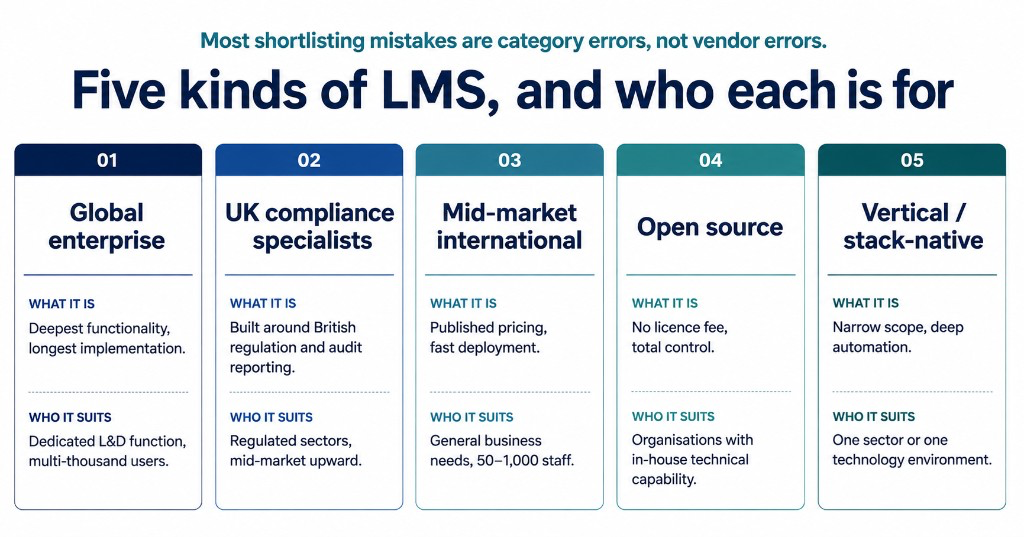
Global enterprise platforms. Docebo, Cornerstone, Litmos, 360Learning. Deep functionality, extensive integration libraries, AI-driven skills mapping. Priced accordingly, usually quote-only, and typically carrying implementation projects measured in months. Right for organisations with a dedicated L&D function and a genuine multi-thousand-user estate. Substantial overkill for an 80-person business that needs mandatory training tracked.
UK compliance specialists. Skillcast, Kallidus, Access Learning. Built around British regulatory requirements, with libraries covering FCA rules, AML, UK GDPR and health and safety, and reporting designed for UK audit expectations. Kallidus, based in Cirencester, works with over a thousand organisations including a substantial number of NHS trusts. Independent listings generally place entry pricing for this tier in the five-figure annual range, which puts it in mid-market and upward territory.
Mid-market international platforms. TalentLMS, LearnUpon, Absorb, iSpring. Published or semi-published pricing, faster deployment, strong general functionality. LearnUpon's multi-portal architecture suits organisations training customers and partners as well as staff. Data residency varies by vendor and sometimes by plan. iSpring, for example, hosts UK and EU data in Europe. Worth checking rather than assuming.
Open source. Moodle and Totara. No licence fee, near-total control, enormous flexibility. You pay instead in hosting, configuration, upgrades and the expertise to run it, whether that sits in your IT team or with a partner. Economical if you already have that capability, expensive if buying it means a new hire or a retainer.
Vertical and stack-native platforms. These specialise deliberately — by sector or by technology environment — and use that focus to automate work a general platform leaves you to do by hand. Cloud Assess is built around vocational assessment and offline mobile use for frontline and deskless workforces. Construction platforms tie competency to physical site access, so an expired card stops someone at the gate rather than surfacing in a report a month later. TrainMeUK is built for UK organisations on Microsoft 365: native identity and provisioning, a UK compliance course catalogue, instructor-led training and qualifications alongside e-learning, and audit-ready reporting. Joiners, leavers and group assignment follow your directory instead of a monthly spreadsheet. Disclosure: TrainMeUK is our own platform.
The most common shortlisting mistake is comparing across categories on price. A £15,000-a-year compliance specialist and a £3,600-a-year mid-market platform are not competing for the same job.
What an LMS Costs in the UK
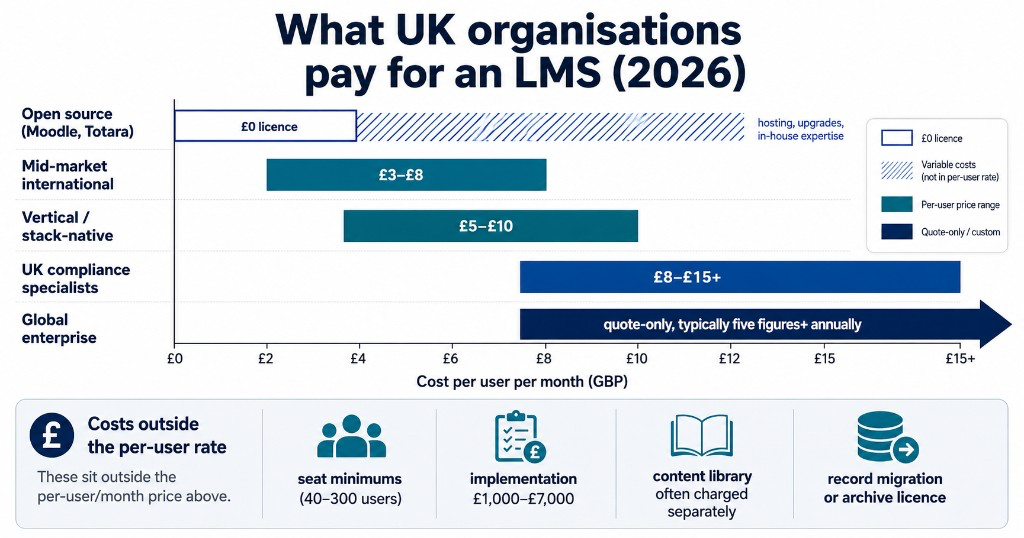
Published cloud LMS pricing in the UK broadly runs from around £2 to £15 per user per month, with enterprise platforms starting in the tens of thousands per year. Six things move the number within that range.
Pricing model. Per-user pricing broadly tracks headcount, although minimum commitments and contracted seat counts can mean your bill does not fall immediately when headcount does. Flat-tier pricing gives a fixed, predictable number within a band, which suits stable headcounts and makes budgeting simpler, though you carry the full tier cost even at the bottom of it. Per-active-user sounds attractive and works well for external audiences like customers or contractors, but if most of your staff log in most months you'll pay close to the standard per-user figure anyway.
What the subscription covers. On a hosted platform the licence fee should include hosting, security patching, product updates, backups and support, which means the figure you compare is close to the figure you pay. Self-hosted open source moves all of that onto you: server capacity, upgrade testing, plugin compatibility and someone accountable for all three. When you compare a £6-per-user subscription against a free licence, the included maintenance is a substantial part of what the £6 buys. Ask any vendor what happens to the price when a major version ships.
Seat minimums. The reliable source of quote shock is not the minimum itself but an undisclosed one. Floors exist for a reason buyers rarely get told: onboarding, support tickets and account management cost a vendor roughly the same per customer regardless of headcount, so a 15-person account generates similar overhead to a 100-person one. A floor is what stops the larger customers subsidising that. Plenty of vendors set one, often somewhere between 40 and 300 users, and publish it clearly. Others advertise £4 per user and mention the 100-seat minimum on the third call, at which point the real entry price is £400 a month whether you have 30 staff or 100. Ask for the floor in the first conversation.
Implementation. Setup fees commonly land between £1,000 and £7,000 depending on complexity. Ask what the fee actually buys, because data migration, SSO configuration and admin training are sometimes included and sometimes quoted separately once you've signed. Get the scope in writing before the contract rather than after.
Content. The platform and the courses are usually separate purchases, and a library subscription can cost as much again as the licence itself. If a catalogue is described as included, establish whether that means every course or a starter selection of ten, and what it costs to add a course outside it. This is the line item that most often doubles a quote between the demo and the contract.
Migration. Two separate problems get conflated here, and the smaller one gets most of the attention. The first is the content: a SCORM package built for one platform can behave differently in another, and quiz scoring or completion reporting can break in ways that only surface once real learners are in it. Fixing a broken package means re-exporting from the original authoring tool, assuming you still hold the source files and a licence for it, or rebuilding the course.
The second problem is the one that costs real money. Your completion dates, scores and issued certificates live in the old LMS database, not in the SCORM files, so none of it moves with the content. Migrating history means an export and an import, usually as a flat file, usually with less detail than you had. Decide early whether you are migrating the record or keeping the old system read-only as an archive until your retention period expires, because the second option is a licence you keep paying for. Ask what the record export actually contains before you sign, and test your three most important packages during the trial.
The honest way to compare is total cost over three years, including licence, implementation, content, support tier and the internal time to run it. A platform at £8 per user with a £3,500 setup fee and a £1,500-a-year content library is a very different proposition from its headline. For organisations under roughly 200 staff, our ranked comparison of the best LMS for small UK businesses goes deeper on published pricing.
The Features That Matter, by Organisation Size
Feature lists are close to worthless because everyone has everything. What changes with size is which capabilities are load-bearing.
Under 50 staff. Speed to value dominates. Can one person configure this in an afternoon? Is there ready-made content so you aren't authoring courses from scratch? Are certificates automatic? At this size an unused platform is the most likely outcome, and simplicity is the main defence against it.
50 to 250 staff. Automation becomes the point. Manual assignment stops scaling somewhere around fifty people, and this is where you need group-based assignment, renewal tracking that fires before expiry rather than after, and reporting a manager can read without training. Single sign-on stops being a luxury.
250 to 1,000 staff. Identity and integration dominate. Automated provisioning and deprovisioning from your directory, role-based access, delegated administration by department or site, and reporting that rolls up across locations. Manual user management at this scale generates its own compliance failures: leavers who retain access, joiners who go untrained for weeks. Where identity and delegated admin start to dominate, see which LMS is right for 200–500 employee UK businesses.
Above 1,000. You're in enterprise procurement, with security review, penetration testing evidence and multi-year contracts.
Evidencing Training to a UK Regulator
Worth being precise here, because a lot of vendor marketing overstates the legal position.
Under the Health and Safety at Work etc. Act 1974, employers must provide the information, instruction, training and supervision necessary to ensure health and safety. The Management of Health and Safety at Work Regulations 1999 pin down when that matters most: on recruitment and when employees are exposed to new or increased risks, with training repeated periodically where appropriate. The statutory duty is to train. It is not, in general terms, to keep a record.
Record-keeping enters through guidance rather than a blanket statutory obligation. HSE's own advice is that keeping records helps you manage training and monitor when refreshers fall due. Following HSE guidance is not compulsory, but the regulator's position is that if you do follow it you will normally be doing enough to comply, and inspectors refer to it.
The training is the legal duty, and the record is how you demonstrate it. Without a reliable record, it can be much harder to show an inspector, customer or court what training was provided and when. Regulated sectors go further: care providers under CQC and financial services firms under the FCA face far more explicit record expectations.
HSE's 2024/25 statistics record 40.1 million working days lost to work-related ill health and injury, 124 worker fatalities and an estimated 680,000 self-reported non-fatal injuries, with the annual cost of workplace injuries and new cases of work-related ill health estimated at £22.9 billion for 2023/24. HSE completed 246 prosecutions in 2024/25 with a 96% conviction rate and fines exceeding £33 million, an average in the region of £134,000 per prosecution, before legal costs, insurance consequences and the ten years a conviction stays on the public register.
A useful record captures who was trained, in what, when, by whom, evidence that understanding was assessed, and the date the refresher falls due. If a platform can't produce that in a single export, it will cost you a day of spreadsheet work every time somebody asks. For what inspectors actually accept, see what counts as training evidence. TrainMeUK's reporting is built around that export.
See what audit-ready records actually look like
TrainMeUK records completion, assessment results, certificate issue and renewal dates against every user, and exports them as evidence. If your current answer to "prove it" involves a spreadsheet and a folder of PDFs, it's worth thirty minutes.
Content Standards: SCORM, xAPI and cmi5
If you own e-learning content, or think you might buy some, the standards question determines whether it moves with you when you change platform.
SCORM 1.2 remains the workhorse of compliance training. Released in 2001 and still widely supported, it answers a narrow question well: did this person complete the course, pass the assessment, and spend the required time?
SCORM 2004 added sequencing and navigation rules, so a course can branch by role or lock a section until prerequisites are met. Fewer platforms support it fully, and some that claim to implement only part of the sequencing model. Worth specifying only if you genuinely need branching.
xAPI (formerly Tin Can) tracks learning events across systems, including offline and mobile activity, but requires a Learning Record Store and a decision about what you intend to do with the data. Plenty of xAPI implementations work technically and produce analytics nobody ever uses.
cmi5 is an xAPI profile that restores SCORM-style launch and completion behaviour on top of xAPI's richer tracking. It is increasingly recommended for new enterprise content, but support outside the large platforms is still patchy. If it matters to you, ask whether it is shipped today or sitting on a roadmap.
"SCORM-compliant" means a platform implements the specification, not that it implements it identically. Content that runs perfectly in one system can lose tracking data in another. If content portability is a real requirement rather than a theoretical one, test an actual package during your trial rather than accepting the tick on the feature list. More detail: SCORM vs non-SCORM training for UK employers.
Your Existing Stack Is a Constraint
If your organisation runs on Microsoft 365, an LMS that integrates natively with it behaves differently from one that offers a connector. Native integration means users provision automatically from your directory, sign in with credentials they already have, receive training notifications in Teams where they already work, and lose access when they leave. A weak integration may mean a nightly CSV and someone to babysit it.
If you're on Google Workspace, the same logic runs the other way. A Microsoft-native platform will mean either manual user management or a middleware layer that someone has to own and maintain.
We build TrainMeUK specifically for the Microsoft 365 case, so this is a section we have an interest in. The underlying point stands whoever you buy from: the largest hidden cost in any LMS is administrative time, and identity management is where most of it goes. A platform that saves a small HR team two hours a week is worth more over three years than one with a longer feature list. Ask any vendor how joiners and leavers are handled before you ask about anything else. See how automated user management works on TrainMeUK, and for the admin overhead angle more broadly, see the hidden admin cost of "affordable" LMS platforms.
How to Run a Selection in 30 Days
Selection processes stall because organisations try to evaluate everything. A tighter approach:
- Days 1–5. Write down the evidence you need to produce. Not features. Evidence. "Prove every site operative holds current CSCS and manual handling." "Show the ICO we trained all staff on data protection this year." This list becomes your test script.
- Days 6–10. Categorise before you shortlist. Decide which of the five market categories fits your size, sector and stack. Shortlist three platforms from within one or two categories, not one from each.
- Days 11–20. Trial against your own scenario. Load your real content or a representative sample, create a real group, assign a real course, and run your evidence export. A vendor demo runs on prepared data and a clean tenant, which is not what you will be working with.
- Days 21–25. Ask the awkward questions. Where does our data live and under what transfer mechanism? What's the seat minimum? What's included in the content library versus charged separately? What does year two cost? What's the exit process for getting our records out?
- Days 26–30. Cost it over three years and decide. Include internal administrative time. It's the number that changes the ranking most often.
Where LMS Projects Go Wrong
You will encounter a claim that 70–80% of LMS implementations fail. It circulates widely and is difficult to trace to a credible primary source, so treat it as folklore rather than evidence.
G2's 2025 corporate LMS data puts average adoption at around 71%, meaning close to three in ten licensed users aren't meaningfully using the platform being paid for, with average implementation running a little under three months. The recurring failure patterns:
- Launching with an empty catalogue. A platform with no compelling content on day one makes a poor first impression that takes months to reverse.
- Recreating a broken manual process inside the software. If your training matrix is chaotic on a spreadsheet, digitising it produces a faster form of the same chaos.
- Treating implementation as a project with an end date. An LMS is permanent infrastructure supporting compliance and audit defence for years, not a rollout that finishes.
- Confusing configuration with adoption. SSO configured and content migrated is not the same as people using it, and nobody discovers the difference until the first compliance deadline.
- Buying for the organisation you plan to become. Enterprise functionality purchased by a 90-person business generally goes unused while the complexity does not.
For the longer view on post-launch failure, see why most LMS platforms fail after the first year and seven signs it's time to replace yours.
How TrainMeUK Fits
TrainMeUK is a UK training operations platform built for organisations running on Microsoft 365: a full LMS combined with the operational layer around it. Data sits in Azure UK regions.
The Microsoft integration is native rather than bolted on: single sign-on, SCIM provisioning from your directory, Teams delivery, and Microsoft Graph orchestration for live instructor-led sessions. Users provision and deprovision with your directory rather than through a manual export.
Alongside e-learning, TrainMeUK manages live training, trainers and rooms, external qualifications, renewals and workforce training records — plus structured learning pathways that package courses, live sessions and sign-off into one programme. See the Training Management System page for how that operational layer sits with the LMS.
The automation runs the full loop: assign, deliver, remind, escalate through your directory hierarchy, issue the certificate, report, and renew. You define the rules and the cadence; the platform executes them. Group and department assignment from your directory is how role, site and team requirements stay current as people move.
The catalogue includes 74 ready-made UK courses covering IT security, health and safety, compliance and financial crime, leadership, and sector-specific areas including safeguarding, food safety and construction. Courses run 15 to 20 minutes with knowledge checks throughout and an end-of-course assessment using multiple formats: multiple choice, true/false, scenario simulations and picture hotspots. Administrators curate which courses appear in their tenant library, so staff see what they need rather than a catalogue of hundreds they'll never take. A built-in Course Builder covers custom content when the catalogue doesn't, with no separate authoring licence.
External qualifications are tracked independently of in-platform courses, so CSCS cards, first aid certificates and professional memberships sit in the same renewal system as your e-learning. For construction, site access control ties competency to physical entry through QR gate access and muster point management.
Pricing is published in pounds: from £249 per month flat for up to 50 users, with a clear per-user rate above that. Content library, Microsoft 365 automation and course authoring are included rather than line items. There's a 14-day trial requiring no card. Onboarding typically runs around thirty minutes, because the core administrative tasks (add a user, add a course, create a group and assign it) each take about two minutes to learn.
Final Takeaway
The UK LMS market is not short of good platforms. Most bad LMS decisions are made by buyers who started looking at software before writing down what evidence they need it to produce.
Write that list first. It does most of the shortlisting for you.
Where to Go Next
This guide covers the market. These go deeper on specific situations.
If you're choosing a platform:
- Training Management System. For buyers who need instructor-led training, qualifications and records alongside e-learning.
- Best LMS for Small UK Businesses. A ranked comparison for organisations under roughly 200 staff.
- Which LMS Is Right for 200–500 Employee UK Businesses. Where identity management and delegated administration start to dominate.
- Best Compliance Training Software for UK SMBs. For buyers whose primary driver is regulatory rather than developmental.
- LMS vs LXP for UK SMBs. If you're still deciding which category you're buying.
- LMS With Built-In Compliance Courses. Topic-by-topic library coverage across UK platforms.
If you already have one:
- When to Replace Your LMS: 7 Signs. The symptoms that mean it's the platform, not the people.
- Why Most LMS Platforms Fail After the First Year. The adoption cliff and what causes it.
- What Counts as Training Evidence: A UK Audit Guide. What inspectors actually accept.
- Why Employees Forget 70% of Training in 24 Hours. Why completion rates overstate what your staff retained.
Best LMS for Small UK Businesses
Ranked comparison for organisations under roughly 200 staff.
Read guide →LMS With Built-In Compliance Courses
Topic-by-topic library comparison across five UK platforms.
Read guide →Best Compliance Training Software
For buyers whose primary driver is regulatory rather than developmental.
Read guide →Frequently Asked Questions
Common questions about learning management systems for UK organisations.
What is a learning management system?
A learning management system assigns training to people, delivers it, records completion and assessment results, and produces evidence of all of it on demand. The defining capability is the record rather than the content delivery: a shared drive can host a course, but it cannot tell you who completed it, what they scored, and when their refresher falls due, or export that for 200 staff. For UK organisations subject to HSE, CQC, Ofsted, FCA or ICO scrutiny, that evidence trail is usually the entire business case for buying one.
How much does an LMS cost in the UK?
Published cloud LMS pricing in the UK broadly runs from around £2 to £15 per user per month, with enterprise platforms typically starting in the tens of thousands per year and open-source options carrying no licence fee but real hosting and maintenance costs. The headline rate is rarely the real cost: seat minimums commonly sit between 40 and 300 users and reset the real entry price if undisclosed, implementation fees often land between £1,000 and £7,000, and content libraries are frequently charged separately from the platform. The reliable comparison is total cost over three years including internal administrative time.
Do UK employers legally have to keep training records?
Generally there is no single statutory provision requiring employers to keep training records. The legal duty under the Health and Safety at Work etc. Act 1974 is to provide the necessary information, instruction, training and supervision, and the Management of Health and Safety at Work Regulations 1999 pin down when that matters most: on recruitment and when employees are exposed to new or increased risks, with training repeated periodically where appropriate. Record-keeping enters through HSE guidance rather than blanket statutory obligation, but the record is how you demonstrate the duty was met — without a reliable record, it can be much harder to show an inspector, customer or court what training was provided and when. Regulated sectors including care under CQC and financial services under the FCA face significantly more explicit expectations.
What is the difference between an LMS and an LXP?
An LMS is administrator-driven: the organisation decides who must complete what by when, and the system tracks and enforces it. An LXP is learner-driven: it surfaces content people might want, recommends pathways, and optimises for discovery and engagement. The practical consequence is that an LXP is well suited to voluntary professional development and poorly suited to proving mandatory compliance training was completed, because it was never designed to compel anything. Many modern platforms blend both, so the useful test is whether the system can produce a compliance export on demand.
What is the difference between an LMS and a training management system (TMS)?
An LMS primarily delivers and tracks learning such as online courses and assessments. A training management system (TMS or TMIS) manages the wider operation around training, including instructor-led sessions, trainers, rooms, attendance, qualifications, renewals and employee training records. TrainMeUK combines both approaches for organisations managing their own workforce training. Learn more about TrainMeUK as a training management system.
Does an LMS need to store UK data in the UK?
There is no absolute requirement that staff training data must be stored on UK soil, but there are requirements about how it leaves. Under UK GDPR, a restricted transfer needs a valid transfer route. Where there is no UK adequacy regulation, this commonly means an appropriate safeguard such as the International Data Transfer Agreement or UK Addendum, together with the required transfer risk assessment; the UK-US Data Bridge also covers self-certified US organisations. UK transfer rules have diverged from the EU's since the majority of the Data (Use and Access) Act 2025's data-protection and privacy reforms came into force on 5 February 2026, and an EU transfer impact assessment is no longer automatically sufficient for UK purposes, so "where does our data live and under what mechanism?" belongs in the first vendor conversation.
Start with a platform built for UK organisations on Microsoft 365
TrainMeUK combines a full LMS with native Microsoft 365 identity, 74 ready-made UK courses, built-in course authoring, and renewal tracking that covers external qualifications alongside your e-learning. Pricing is published in pounds and the trial takes no card.