

Daniel Hyatt
TrainMeUK Founder
Monday, 7:15
Five people are at the gate. The paperwork is not.
One subcontractor has not finished the induction. Another has a CSCS card that expired last week. Their supervisor says it was sorted on Friday.
The SHEQ manager is still chasing renewals. Another site has not had its minimum courses assigned. A client wants evidence that everyone on the project is qualified.
Construction training is the record behind that morning: the right people, the right qualifications, the hazards on this site, and proof they were allowed to start.
The aim is to do that without somebody spending the week chasing certificates and updating spreadsheets.

We looked at seven construction training management software platforms through the situations construction businesses actually deal with, rather than a catalogue of features in isolation.
TrainMeUK
Workforce learning, qualifications, and site compliance: contractor onboarding, gate checks, attendance and evacuation.
iHASCO
Ready-made UK workplace and construction safety courses in Atlas: assignments by role, certificates and refresher reminders.
Altora
Contractor onboarding and digital inductions: company and worker documents, compliance review, and an optional site check-in.
GoContractor
Construction workforce onboarding: invitations, credential uploads, project orientations and a digital record a supervisor can check.
Intasite
Site inductions and contractor documentation: online completions, visitor management, attendance records and commissioned video where required.
MSite
Construction workforce management and physical site access: inductions, electronic card checks, and readers or turnstiles.
Totara with BuildEmpire
Configurable enterprise learning on Totara: programmes, audiences, pathways, certification rules and exportable training records.
If you only read one table
A starting shortlist. The seven situations below are where the differences show up.
| TrainMeUK | Connected workforce training, external qualifications and site compliance |
| iHASCO | Ready-made UK construction and workplace safety courses |
| Altora | Contractor-company prequalification, onboarding and documentation |
| GoContractor | High-volume workforce onboarding, QR checks and site check-in |
| Intasite | Site inductions, visitor management and professionally produced content |
| MSite | Physical site access and electronic card verification |
| Totara with BuildEmpire | Configurable enterprise learning management |
For small and mid-sized UK construction businesses that want employee training, external qualifications and site compliance without a dedicated LMS administrator, TrainMeUK is worth shortlisting. Where the priority is a specialist course library, contractor-company prequalification or physical access control, iHASCO, Altora and MSite are the closer looks.
A note about this comparison: TrainMeUK publishes this guide, so we're not a completely independent reviewer. The comparisons are based on vendor documentation, published product information and our experience developing construction training software, rather than identical hands-on testing of every platform. Product capabilities may differ by package.
Every TrainMeUK journey below includes Site Management: contractor registration, site-specific requirements, gate checks, attendance and evacuation. It is a separate paid module. Published pricing is £1.50 per permanent user per month on top of the TrainMeUK plan, plus £1.50 for each contractor who signs in to a site during that month. A contractor who stays registered but does not sign in is not charged for that month. Altora's check-in and MSite's access equipment are included on the same basis.
Gold, silver and bronze reflect how complete that workflow is, how many separate steps it takes, how much of it runs without an administrator, and how well it fits UK construction operations. They are our reading of published capabilities, not measured results from identical product testing.
Five subcontractors are starting on Monday. Are they ready?
A groundworks subcontractor is sending five operatives to a new project.
Before anyone picks up a tool, the principal contractor needs their details, evidence of relevant qualifications, a completed induction and confirmation that they meet the site's requirements.
Ideally, most of this happens before Monday morning. The wider record-keeping problem is covered in managing subcontractor training records.
The worker's journey
Smoothest journey first. Gold, silver and bronze are the closest fits.
| Gold TrainMeUK |
Worker scans a registration QRcreates an accountreceives site induction, qualification and assessment requirementsuploads evidence for approvalpresents a compliance passport QR at the gate. |
| Silver GoContractor |
Worker receives an onboarding invitationregisters and uploads credentialscompletes the project orientationsupervisor checks their onboarding status or digital credential. |
| Bronze Altora |
Contractor registerssubmits required company and worker documentscompletes inductioncompliance is reviewedworker checks in through Altora's optional Check-in system. |
| MSite | Worker pre-registerscompletes the required inductionqualifications are checkedaccesses the site through its configured workforce access system. |
| Intasite | Worker receives an induction invitationcompletes training and submits documentationadministrator reviews requirementsworker follows the configured site check-in process. |
| BuildEmpire | Administrator assigns the required learning and certificationsworker completes trainingcompletion status is recorded. Contractor registration and gate access require separate arrangements. |
| iHASCO | Administrator assigns training through Atlasworker completes the coursescompletion records and certificates are available. Contractor registration and site-entry checks need another process. |
What actually matters
The difference isn't simply whether each platform offers an online induction. It's what happens before and after it.
With Site Management included, a contractor can register from a site QR, receive that site's induction, tickets and assessments, and present the same record at the gate. That single path is why TrainMeUK leads this situation.
GoContractor is the closer look when the job is inviting operatives and collecting credentials for a supervisor to confirm. Altora is the closer look when the subcontractor company's documents have to be reviewed as well as the people. Altora also assigns training, tracks expiry and can check requirements at its check-in. TrainMeUK's distinction here is the LMS around that path: permanent staff from Microsoft Entra ID, the course catalogue, and the same record at the gate. MSite is the closer look when readiness has to open a physical gate, which is covered later.
Altora's check-in is a separate component. TrainMeUK's contractor registration and gate check are part of Site Management, which this guide includes.
You've got 200 workers across five sites. Who needs training?
Some people need annual health and safety refreshers. Others need working-at-height awareness, COSHH or company-specific procedures.
New starters are joining, experienced workers are changing roles, and the training matrix never seems quite up to date.
The challenge isn't just delivering the training. It's ensuring the right courses reach the right people, and stay current as the workforce changes. Refresh rules for that workforce are covered in construction training expiry and refresh cycles.
The training journey
Smoothest journey first. Gold, silver and bronze are the closest fits.
| Gold iHASCO |
Administrator selects relevant courses from its extensive catalogueassigns training by role or workforce groupworkers complete coursesAtlas records certificates and manages refresher reminders. |
| Silver TrainMeUK |
Employee is added or updated from Microsoft Entra IDgroups based on role, department or location can assign their coursesreminders run, and a refresher can be assigned before a duration-based course lapsesmanagers monitor outstanding training. |
| Bronze BuildEmpire |
Administrator configures learning programmes, audiences and certification rulesworkers receive assigned learningthe platform tracks completions and recertification. |
| Altora | Administrator builds induction and training programmesassigns them to workers or contractorscompletions, certificates and renewal dates are tracked. |
| MSite | Workers receive required site inductions and training activitiescompletions and workforce competency information are recorded within the configured system. |
| Intasite | Site teams assign digital inductions and safety briefingsworkers complete assessmentsrecords are stored for site compliance and reporting. |
| GoContractor | Workers receive project-specific orientations and safety requirementscomplete learning during onboardingsupervisors review their readiness for the project. |
The important difference
iHASCO deserves particular attention for its training library. It offers a much broader range of specialist construction courses, including subjects such as asbestos awareness, CDM, working at height, dust and hand-arm vibration.
TrainMeUK currently includes more than 70 workplace courses, of which three are written for construction, alongside general safety subjects such as COSHH, PPE, manual handling and working at height. The working-at-height course is awareness training. The catalogue does not include ready-made asbestos awareness, confined spaces, excavation, scaffolding competence, SMSTS, SSSTS, CSCS test preparation, IPAF or PASMA. Those stay as external qualifications, or as courses the company writes or imports. What counts as mandatory for a given role is a separate question — see mandatory construction training in the UK.
For companies that primarily want ready-made construction safety content, iHASCO is the smoother choice, which is why it leads this table.
TrainMeUK is the smoother choice when the hard part is keeping assignments current: permanent staff arrive from Microsoft Entra ID, change department or role, and a duration-based course can be reassigned about two weeks before it lapses. The current completion stays valid until that date. That automation still needs a course to assign, and it does not renew an external ticket.
Importantly, awareness training doesn't replace the practical instruction, supervised experience or formal qualifications required for particular construction tasks.
A worker's CSCS card expires on Friday. Who notices?
The worker completed their induction months ago. They're experienced, know the site and have been working without issues.
But their required card is about to expire.
Does somebody notice before Friday? What happens when the replacement arrives? And if the worker turns up without valid evidence, will the site team know? Visual checks and live verification are a different problem again — see how to stop expired CSCS cards reaching site.
The qualification journey
Smoothest journey first. Gold, silver and bronze are the closest fits.
| Gold MSite |
Worker qualifications are collected and checkedsupported electronic accreditation checks can verify card informationconfigured physical access controls can restrict entry when requirements fail. |
| Silver TrainMeUK |
Worker uploads the card, card type and validity datesadministrator approves itreminders run before it expiresworker uploads replacement evidencean expired, rejected or missing required certificate fails the site compliance check. The check uses TrainMeUK's approved record. It does not run a live CSCS Smart Check. |
| Bronze Altora |
Worker or contractor submits credentialsadministrator reviews complianceexpiry tracking highlights outstanding renewalsconfigured site check-in rules can identify missing requirements. |
| GoContractor | Worker uploads qualifications during onboardingexpiry dates and requirements are trackedsupervisors can check credential status through the worker's digital record. |
| Intasite | Worker submits qualificationsdocuments are reviewed and expiry dates monitoredoutstanding evidence can be identified within the contractor compliance process. |
| BuildEmpire | Certification requirements and validity periods are configuredreminders and recertification workflows manage learning records. Construction card verification requires additional assessment. |
| iHASCO | External training records can be maintained in Atlas alongside course completions. Its full construction card approval and gate-check workflow isn't established as a standard feature. |
Tracking a card isn't the same as verifying it
This is an important distinction.
Recording that someone's CSCS card expires on 18 October is useful. Checking its authenticity and current status against an authoritative card scheme is a different capability.
MSite advertises electronic construction accreditation checking and can connect compliance outcomes to physical site access.
TrainMeUK records CSCS card type, supporting evidence, expiry dates and administrator approval, but does not currently perform live CSCS Smart Check verification.
With Site Management, an expired, rejected or missing required certificate fails the site compliance check until it is resolved. That check uses the approved record held in TrainMeUK.
That makes it useful for enforcing requirements against approved internal records, but organisations requiring authoritative electronic card verification should check that requirement separately.
Also, unlike online course renewals, external qualifications don't automatically renew themselves. Someone still has to obtain the new qualification and provide acceptable evidence.
A new site opens. What is the minimum someone must complete before they can work there?
In this guide, an induction is the minimum set of courses a person must be assigned, and complete, before they are allowed on that site.
The company may already have those courses. The Friday job is deciding which of them this project requires, getting them onto the right people, and being able to see that they are done. A course already completed counts on every site that requires that same course. The new site only adds the extra courses it requires. What principal contractors are expected to keep is set out in site induction records.
The induction journey
Smoothest journey first. Gold, silver and bronze are the closest fits.
| Gold TrainMeUK |
The site team sets the minimum courses for that site, on top of the company-wide seta contractor scans the site QR, registers, and is assigned that setthey complete those courses and upload any required ticketsthe site scans their compliance passport and they are clear only if that site's minimum is done. |
| Silver Altora |
Administrator assigns the induction courses and required documents for the relevant workforceworkers complete themcompletion is tracked, and check-in can test those requirements. |
| Bronze GoContractor |
Site team sets the project orientation and safety courses workers must completeworkers finish them during onboardingsupervisors see who is ready for the project. |
| MSite | Site team sets the induction courses required before arrivalworkers complete themthe result sits on that site's workforce record. |
| Intasite | Site team assigns the required inductionworkers complete it online before they arrivearrival can check that the induction is done. |
| iHASCO | Administrator assigns the relevant ready-made courses as the training those workers must complete. Site-entry checks sit in another process. |
| BuildEmpire | Administrators assign the required courses and pathwaysworkers complete that learningcompletion is recorded. Which courses a particular site requires is a separate setup. |
The induction is the minimum set for that site
TrainMeUK leads this situation because the courses required for the site are assigned when the contractor registers, and the gate uses that same set. Company-wide courses apply everywhere, and a course already completed counts on any site that requires it. This project can also require extra courses. Those still have to be done before the gate clears the person for this site. An uploaded ticket counts only after an administrator approves it and it is still in date.
Producing a new course, including a filmed one, is a different job. Intasite is the closer fit when a project wants professionally filmed or animated site training. That production is not what this table is ranking.
See training, qualifications and site checks in one workflow
TrainMeUK connects workforce learning, external tickets and site compliance, so the same records can follow a worker from onboarding to the gate.
Twenty workers arrive at the gate. Who can actually come in?
This is where the paperwork meets reality.
A worker may have completed their general training but not the induction for this particular project. Another may have a valid CSCS card but still be missing an approved risk assessment.
The site supervisor needs a reliable answer, preferably before a queue starts forming. Construction training software is only useful here if the check uses the same records as the training.
The site-entry journey
Smoothest journey first. Gold, silver and bronze are the closest fits.
| Gold MSite |
Worker presents their configured identity credentialthe system checks the applicable statusintegrated readers or turnstiles control physical access. |
| Silver TrainMeUK |
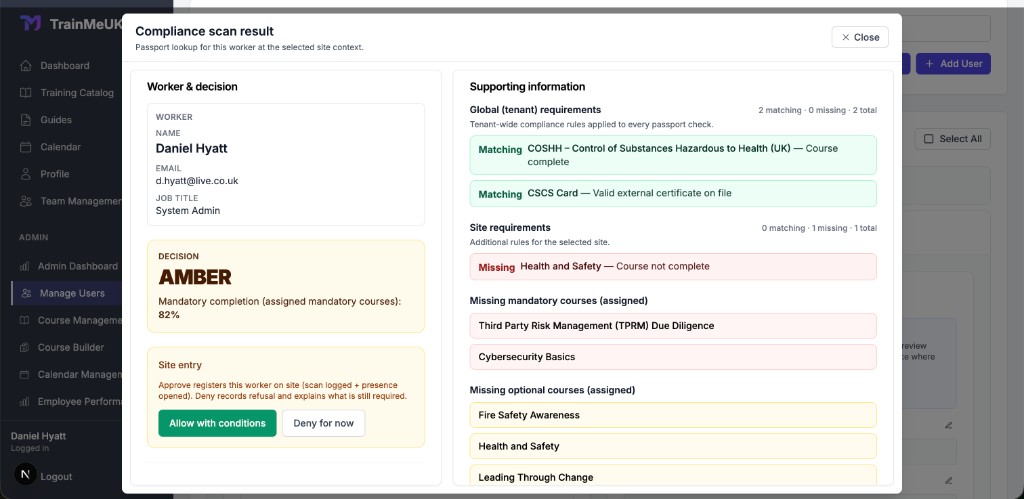
Gate staff scan a worker's compliance passport QRcompany-wide rules, that site's rules and mandatory training are checkedGreen can open an on-site record, Amber needs an authorised decision, and a denied result cannot open one. |
| Bronze Altora |
Worker checks in using the configured QR or kiosk processthe Check-in module evaluates applicable induction and compliance requirementsthe site records their attendance. |
| Intasite | Worker presents their induction or visitor credentialsthe configured system checks required records and handles check-in or linked access arrangements. |
| GoContractor | A supervisor scans the worker's QR code and opens their profilecrews can check in and check out so the site can see who is presentthe published offering can also connect to an access-control system. |
| iHASCO | Training completion and certificate records are available in Atlas. Physical entry and site check-in are handled through another process. |
| BuildEmpire | Training and certification records can be reviewed, but construction gate entry requires a separate access process or integration. |
The distinction is physical versus software-controlled access
For large construction projects with turnstiles, biometric readers and substantial daily traffic, MSite offers functionality that most conventional LMS platforms simply aren't designed to provide.
For smaller sites, the practical requirement may be different: the supervisor needs to check compliance quickly, record the decision and know who has entered.
TrainMeUK's QR compliance scanner is designed around that workflow. It checks company-wide rules, that site's rules and mandatory training, including approved qualifications and risk assessments, records the result and can open an on-site attendance record.
An amber result can be conditionally accepted by an authorised user. A denied result cannot open presence.
But a software refusal isn't a locked physical gate. TrainMeUK doesn't currently operate biometric turnstiles, and the site still needs appropriate physical and supervisory controls. GoContractor's construction page publishes a QR worker check and site check-in and check-out, and says that check-in can connect to access-control systems. That is site attendance and a profile lookup. It is a different control from a turnstile that opens or stays shut.
The right choice depends on the kind of site you're running.
The fire alarm sounds. Who's still on site?
This is not the moment to discover that the signing-in book is incomplete.
Workers may be spread across different work areas, subcontractors have arrived throughout the morning, and people are heading towards several assembly points.
The question is straightforward: who was on site, and who has been accounted for? The register and the roll call are covered in more detail in evacuation roll call and the fire register.
The emergency journey
Smoothest journey first. Gold, silver and bronze are the closest fits.
| Gold TrainMeUK |
Successful gate checks build the live registera site manager starts an evacuationworkers scan muster-point QRsthe dashboard separates accounted-for and outstanding peopleresults can be exported. Someone who leaves without checking out can remain on the register until they check out or the site's automatic sign-out closes the record. |
| Silver Intasite |
The visitor and contractor register produces an evacuation liststaff can check people off at the assembly pointinduction status can be checked when someone arrives. |
| Bronze MSite |
Workforce access and attendance data provide site-presence information. The exact emergency roll-call and muster process depends on deployed modules. |
| Altora | Its Check-in system records workers present on site. Buyers should confirm the exact emergency evacuation and roll-call functions in their chosen package. |
| GoContractor | Published check-in and check-out show who is on site. A muster-point roll call is not described in the construction offering reviewed for this guide. |
| iHASCO | Provides relevant fire safety and emergency training records. Live site evacuation roll calls need another system or process. |
| BuildEmpire | Training records can demonstrate completed emergency instruction, but live site occupancy and evacuation accounting require another system. |
Training people for an emergency is different from managing one
Most learning platforms can help organisations deliver fire safety training.
That's useful, but it doesn't tell the fire marshal how many people are still inside the site boundary.
TrainMeUK leads this situation on the path from a compliance check-in to the muster, not only on whether an evacuation list exists. Intasite's visitor management page publishes that list and an assembly-point check-off, which is why it is second. Site Management, included throughout this guide, starts the roll call from people the gate signed in. It supports separate muster points, live incidents, drills and tests, with recorded timestamps.
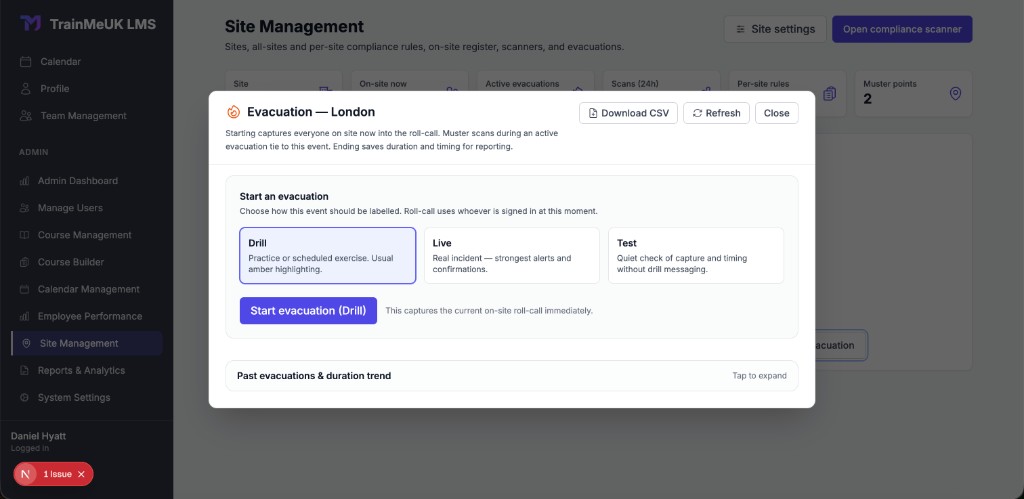
There is an important operational limitation: like other attendance-based systems, the register depends on accurate sign-in and sign-out information. A worker who leaves without checking out may still appear until their presence record is closed automatically.
No electronic register should replace an appropriate site emergency plan and physical headcount procedures.
Nevertheless, having site attendance and evacuation records connected to the same workforce data can reduce duplicated administration.
The client wants three years of compliance records by lunchtime
The email lands at 9:10 am.
The client wants evidence that everyone who worked on a project completed their mandatory training, held valid qualifications and met the relevant site requirements.
They'd also like copies of the certificates.
For many companies, this is where somebody opens a collection of spreadsheets, email folders and shared drives. What clients typically ask for is set out in construction audit and PQQ training evidence.
The reporting journey
Smoothest journey first. Gold, silver and bronze are the closest fits.
| Gold TrainMeUK |
Administrator opens the relevant reportsfilters training records by date, department, course and statusdownloads completions, certificate files, risk assessment approvals, site scan records and evacuation roll calls. |
| Silver MSite |
Project team accesses workforce dataproduces reports covering relevant inductions, qualifications, attendance and labour activity. |
| Bronze Altora |
Administrator reviews induction, contractor and compliance recordsexports available certificates, documents and compliance reports from the relevant modules. |
| Intasite | Administrator accesses site induction and contractor recordsretrieves training outcomes, submitted documents and available attendance evidence. |
| iHASCO | Administrator uses Atlas reportingfilters training activityexports completions, certificates and training records. |
| GoContractor | Project team reviews worker onboarding and qualification recordsretrieves evidence of completed orientations and submitted credentials. |
| BuildEmpire | Administrator runs configured learning and certification reportsfilters the required audience and periodexports training evidence. |
Good reporting starts before the audit
All seven platforms provide some form of training or compliance reporting.
But they don't necessarily hold the same information.
An LMS might prove somebody completed a course. A contractor management platform might show their submitted documents. A site access system might establish when they entered and left a project.
The practical question is how much evidence the organisation needs to reconstruct from different systems.
TrainMeUK maintains training records, external qualifications, approval decisions and, through Site Management, compliance scans and evacuation records.
Its HSE-oriented report pack also groups training evidence against tagged regulatory frameworks.
That doesn't automatically certify legal compliance. It does, however, provide a structured way to retrieve the underlying evidence. Those exports are the records that were kept: completions, including archived passes, approved tickets, the scan decision that was logged, and the roll call. They show what was recorded. They do not rebuild every rule that applied to a person on a past date unless that decision was logged at the time.
For organisations regularly completing prequalification questionnaires, client audits and internal SHEQ reviews, that distinction matters. The wider picture sits in construction compliance training in the UK.
How the seven workflows fit together in TrainMeUK
We've looked at seven everyday construction problems individually.
But for many businesses, the biggest frustration isn't any one of them. It's the work involved in keeping them connected.
The induction lives in one system. CSCS records sit in a spreadsheet. Risk assessments are emailed to a supervisor. Somebody signs workers in at the gate, and the training manager maintains a separate completion report.
Each process might work reasonably well on its own.
It's the handovers that create the chasing.
TrainMeUK is designed to connect these activities into one continuous workflow.
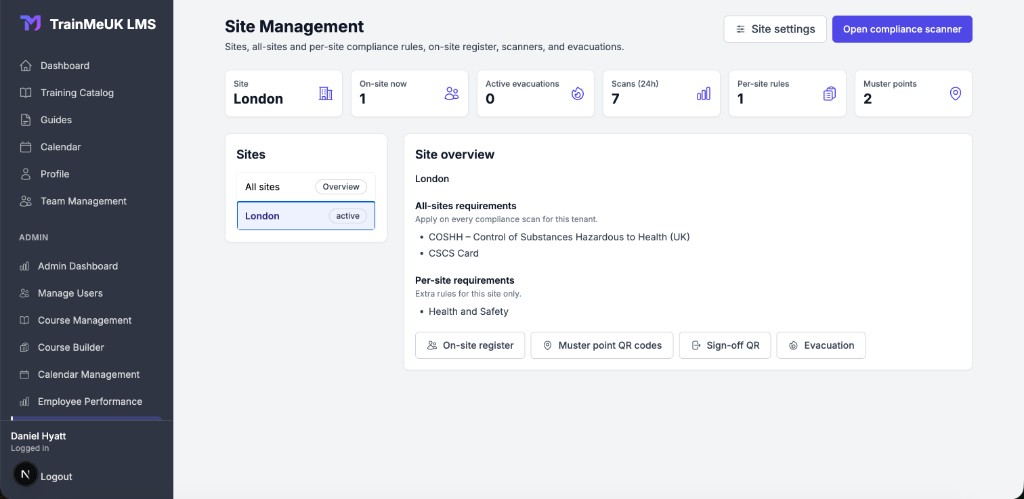
From new starter to site-ready worker
The worker joins. Permanent employees can be created and updated automatically through Microsoft Entra ID. Contractors register themselves through a site-specific QR code or public link.
Their requirements are assigned. Employees receive training through assignment rules. Contractors receive the onboarding package for that site, which assigns the minimum courses, tickets and assessments they need before they can be on site.
Training is completed. Workers complete their assigned courses online. Organisations can use TrainMeUK's included workplace catalogue, import existing SCORM content or create site-specific training using the AI Course Builder.
Qualifications are checked. Workers upload evidence of CSCS, IPAF, PASMA and other required tickets. Administrators approve or reject submissions, and expiry dates are monitored. IPAF and PASMA use the same evidence process as other tickets. TrainMeUK does not check these cards live with the issuing schemes.
Site-specific requirements are applied. Company-wide courses apply everywhere. A project can add extra courses, qualifications and approved assessments. A course already completed counts on every site that requires that same course. Someone can still be short of a course the next site asks for.
The worker arrives at the gate. Gate staff scan their compliance passport QR. The system checks company-wide rules, that site's rules and mandatory training. A green result, or an amber result an authorised person accepts, can open attendance. A denied result cannot.
Site presence is managed. Workers scan the site's checkout QR when they leave. The on-site register is the headcount for that site and the starting list for an evacuation roll call.
The evidence is already there. Training completions, qualification documents, approvals, compliance decisions and available attendance records can be retrieved when clients or auditors ask.
And the routine work continues in the background
The system doesn't stop working once the worker has completed their first induction.
Role changes
When department or job title changes in Entra ID, assignment rules follow the groups that person now belongs to. People who leave a role are not chased for training they no longer need.
Course renewals
About two weeks before a duration-based online course lapses, a refresher can be assigned. The current completion stays valid until its expiry date.
External tickets
Reminders start before a ticket expires. Replacing it means uploading new evidence. The course renewal job does not renew the card.
The next project
A scan at another site checks that site's rules as well as the company-wide ones. A course already completed counts wherever that same course is required.
And because these processes use connected records, the same information doesn't need to be manually recreated in several places.
That's the real value of joining the dots: not simply completing tasks faster, but reducing the number of separate tasks someone has to remember to do.
Site Management is included in every site journey in this guide. Training delivery, automation, external qualifications, Microsoft 365 and reporting are also available on the core LMS.
TrainMeUK doesn't currently provide direct CSCS Smart Check verification or physical turnstile access control, so businesses needing those capabilities should assess specialist systems alongside it. For a wider look at LMS platforms outside construction, see the 2026 LMS platform comparison.
Which construction training platform should you choose?
There's no universal answer, because not every construction company needs the same things.
A specialist subcontractor with 60 employees has very different requirements from a Tier 1 contractor operating a major infrastructure project.
Here's how I'd approach the shortlist.
Ready-made specialist construction safety courses
iHASCO, with TrainMeUK for broader workplace training
Training, qualifications and site compliance in one system
TrainMeUK
Subcontractor-company prequalification and documentation
Altora, Intasite
High-volume project onboarding
GoContractor, Altora, MSite
Professionally filmed site training
Intasite
Biometric access, turnstiles and electronic card checks
MSite
Complex enterprise-wide learning and certification
Totara with BuildEmpire
What should a smaller or mid-sized construction company prioritise?
If you're running several sites with a mixture of permanent employees and subcontractors, I'd start with the process that costs your team the most time.
Is it repeatedly chasing training completions?
Keeping track of expiring CSCS, IPAF and PASMA certificates?
Setting the minimum courses for every new site?
Checking whether workers are ready to enter a site?
Or gathering records whenever a principal contractor requests evidence?
Some platforms specialise in one or two of those problems. Others bring several together.
For organisations that already have established access-control or contractor management systems, a focused LMS such as iHASCO or an enterprise learning platform such as BuildEmpire may fit into the existing technology environment.
For companies wanting a single system to handle more of the process, TrainMeUK is worth considering.
Its approach combines learning, included workplace courses, AI-assisted authoring, external qualifications and automated training administration, with site compliance and attendance through Site Management.
The aim is simple: less time chasing training and paperwork, more confidence that workers have met the requirements of the job.
What to check before choosing construction training software
Whatever you choose, don't rely solely on a feature list or a sales demonstration showing ideal conditions. Ask the provider to demonstrate the difficult cases.
Pay particular attention to what's included in the subscription, what needs additional modules, and what requires integration with other systems.
Finally, remember that online training records and software checks are only part of construction competence management. Appropriate experience, supervision, practical assessment and verification of relevant qualifications remain essential.
Final thoughts
The best construction LMS isn't necessarily the one with the longest feature list, the largest course catalogue or the most sophisticated gate hardware.
It's the one that fits how your organisation actually works.
iHASCO is particularly strong for ready-made safety training. Altora and GoContractor focus on contractor onboarding. Intasite offers specialist site induction and documentation workflows. MSite brings together workforce records and physical access control. Totara with BuildEmpire offers extensive learning management flexibility for larger organisations.
TrainMeUK fits organisations that want workforce training, external qualifications and site compliance in one system, including teams without a large training administration function. Site compliance is the Site Management module, and this guide includes it.
Where the priority is a specialist course library, contractor prequalification, filmed site training or turnstile access, the platforms named above are the closer fit. Where the priority is keeping those jobs in one record, TrainMeUK is worth a look.
And ultimately, that's what good training software should do.
Help keep people properly trained, make the right evidence available when it's needed, and let the people running construction projects spend less time administering the process.
Related articles
Subcontractor Training Records
How to keep supplier evidence current across projects.
Read More →Stop Expired CSCS Cards Reaching Site
Why recording a card is not the same as verifying it.
Read More →Site Induction Records
What principal contractors need to be able to show.
Read More →Evacuation Roll Call and Fire Register
Who is on site when the alarm sounds.
Read More →Audit and PQQ Training Evidence
The records clients ask for by lunchtime.
Read More →Construction Training Matrix
How to decide who needs which training.
Read More →Frequently asked questions
What is the best LMS for a small construction company?
It depends on the organisation's requirements. iHASCO is worth considering for specialist ready-made construction courses, while TrainMeUK is suited to businesses that also need automated training assignments, external qualification tracking and connected compliance workflows.
Can an LMS track CSCS, IPAF and PASMA certificates?
Some can. Look for external qualification records with supporting evidence, expiry dates, approval workflows and reminders. Not every LMS supports these capabilities, and recording a card is not the same as electronically verifying it with the issuing scheme.
Can construction workers complete site inductions before arriving?
Yes. Several providers, including TrainMeUK, Altora, GoContractor, Intasite and MSite, let workers complete the courses required for that site before they arrive, subject to the chosen package and setup.
Can an LMS stop someone entering a construction site?
Some platforms can identify missing compliance requirements and prevent an electronic check-in. Others integrate with physical access control equipment. These are different capabilities, so construction companies should establish whether they need software authorisation checks, physical gate enforcement or both.
What's the difference between construction LMS and contractor management software?
An LMS primarily delivers and tracks learning. Contractor management software focuses on onboarding, documentation, credentials, approvals and contractor relationships. Some platforms combine elements of both, alongside site attendance and access control.
Does online health and safety training prove a construction worker is competent?
Not by itself. Competence depends on the work being undertaken and may require practical skills, knowledge, experience, supervision and formal qualifications. Online training can contribute to competence management but shouldn't replace the assessment needed for safety-critical work.
Less chasing, clearer evidence
See how TrainMeUK handles workforce training, external qualifications and site compliance for UK construction teams.