
Introduction
Ask most people to make training "more engaging" and they reach for the same fix: add some images. Drop a stock photo on the slide. Put an icon next to each bullet. Add a diagram somewhere near the text.
It rarely helps — and often makes things worse.
There's a real principle underneath the instinct. The brain processes verbal information and visual information through two separate channels, and using both together can produce stronger, more durable learning than using either alone. That's the dual coding effect, and it's one of the most useful ideas in instructional design.
But — and this is the part most "add a picture" advice misses — dual coding only works when the words and visuals are designed to be processed together. Pair them badly and you don't double the learning; you split attention, overload working memory, and teach less than plain words would have. The benefit isn't in the pictures. It's in the integration.
This article explains what dual coding is, the two-channel model behind it, the design principles that make it work, and the common ways it backfires. It builds directly on Cognitive Load Theory — dual coding done well is one of the best ways to teach more without overloading the brain.
What Is Dual Coding?
Dual coding is the principle that information presented in both verbal and visual form is remembered better than information presented in just one.
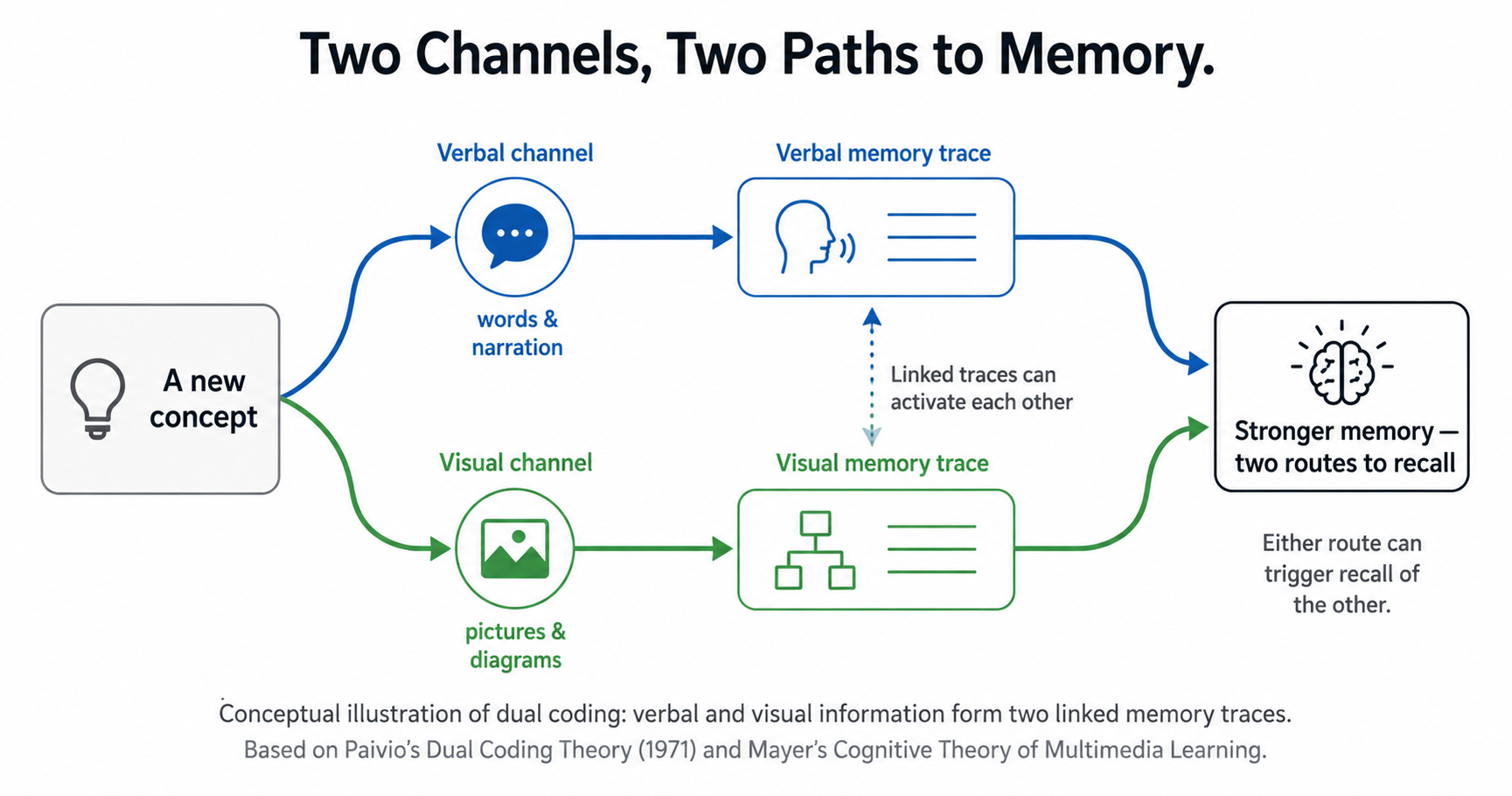
The idea comes from psychologist Allan Paivio, who proposed Dual Coding Theory in the 1970s. His insight was that the mind has two distinct systems for representing information: a verbal system that handles words and language, and a non-verbal (visual/imagery) system that handles pictures and mental images. When you encounter a concept through both — hearing the word and picturing the thing — you create two separate but linked traces in memory. Later, either one can trigger recall of the other, giving you two routes back to the knowledge instead of one.
That's the core of it: two codes, two retrieval paths, stronger memory. A concept you've only read about has one thread tying it down. A concept you've read about and seen represented has two.
The Two Channels: How the Brain Splits the Work
The reason dual coding works ties directly to how working memory is built. Working memory isn't one single store — it has separate components for processing what you hear and what you see. This is why a diagram and a spoken explanation can be handled at the same time without competing: they're travelling down different roads.
Try to push everything down one road, though, and it jams. A dense slide of text forces both the reading and the comprehension through the visual channel alone, while the auditory channel sits idle. Worse, if someone reads that text aloud while it's on screen, you've now loaded the same information into both channels redundantly — doubling the work for no gain.
The practical upshot is elegant: by splitting information sensibly across the two channels — words through one, supporting visuals through the other — you effectively expand how much a learner can process at once. Dual coding isn't just about memory traces; it's about using the brain's full processing bandwidth instead of overloading half of it.
From Theory to Design: Mayer's Multimedia Principles
Paivio gave us the theory. The person who turned it into practical rules was Richard Mayer, whose decades of experiments produced the Cognitive Theory of Multimedia Learning. His central, well-replicated finding is simple: people learn more deeply from words and relevant pictures together than from words alone — provided the two are processed together in working memory.
From that work came a set of design principles, the most important of which for training are:
- Coherence — strip out anything that doesn't serve the learning. Decorative images, background music, and "interesting but irrelevant" detail all compete for attention and reduce learning.
- Modality — pair visuals with spoken words rather than on-screen text, so processing spreads across both channels.
- Redundancy — don't narrate text that's already on screen word-for-word; it overloads rather than reinforces.
- Contiguity — keep related words and visuals close together in space and time, so the learner doesn't have to hold one while hunting for the other.
Notice what these have in common. None of them say "use more visuals." They all say "make the words and visuals work as a single, integrated message." That's the real lesson of dual coding, and it's the opposite of how most people apply it.
Why "Just Add a Picture" Backfires
Here's the uncomfortable truth that separates a genuine understanding of dual coding from the cargo-cult version: adding visuals to training can make it worse, not better.
The research is clear that the benefit depends entirely on the quality of the relationship between the words and the images. When that mapping is tight and meaningful, learning flourishes. When it's loose, decorative, or irrelevant, cognition fragments and you've simply added cognitive load for no learning benefit.
The common failure modes:
- Decorative images that look engaging but carry no information — pure extraneous load.
- Redundant text read aloud verbatim — the same content jammed into both channels at once.
- Split attention — a diagram on one side, its explanation on the other, forcing the learner to ping-pong between them.
- Visuals for the sake of it — an icon beside every bullet, adding clutter without meaning.
This is also why dual coding and Cognitive Load Theory are really two sides of one coin. Done well, dual coding reduces load by spreading it across channels. Done badly, it creates load by cluttering one. The technique is only as good as the design discipline behind it.
The Modality Principle: Narrate, Don't Caption
If you take one practical rule from all of this, make it the modality principle, because it's the one most often got wrong.
When you have a visual — a diagram, an animation, a process flow — explain it with spoken narration, not a block of on-screen text. The reason is mechanical: a visual plus on-screen text loads everything into the visual channel, which competes with itself. A visual plus spoken words sends the picture through the visual channel and the explanation through the auditory channel, so they're processed in parallel rather than fighting for the same lane.
The everyday version of getting this wrong is the slide crammed with text that the presenter then reads aloud. The audience can't read and listen at once, so both suffer. The fix isn't a better photo — it's moving the words off the screen and into narration, leaving the visual to do its own job.
How to Apply Dual Coding in Workplace Training
Translating the principles into practical training design:
- Pair every key visual with spoken explanation, not a paragraph of caption.
- Use visuals that carry meaning — process diagrams, annotated screenshots, flowcharts — not decorative stock imagery.
- Cut redundant text. Say it or show it, not both identically.
- Keep words and their visuals together, on screen at the same time and in the same place.
- Match the visual to the concept. A diagram for a process, a chart for a trend, an annotated image for a physical task. The closer the mapping, the stronger the effect.
- Strip the decoration. If an image doesn't help someone understand or remember, it's costing attention, not earning it.
The discipline throughout is the same: visuals should do work, not fill space.
Why This Matters for UK Businesses in 2026
Most workplace training over-relies on one channel: dense, text-heavy slides and documents that ask people to read their way to competence. It feels thorough, but it leaves half the brain's processing capacity unused and quietly fails the modality principle at every turn.
For compliance and procedural training especially, this is a missed opportunity. A safety procedure, a data-handling workflow, a software task — these are exactly the kinds of content where a well-designed visual paired with clear narration produces far better understanding and recall than a wall of text ever could. And because regulators and auditors ultimately care about whether staff can apply what they learned, not whether they clicked through it, the gain in genuine comprehension matters.
For an SME without a dedicated instructional designer, dual coding offers a reassuringly cheap lever: it isn't about expensive production or more content. It's about pairing meaningful visuals with spoken explanation and cutting the clutter — design discipline, not budget.
Build Training That Uses the Whole Brain
TrainMeUK courses combine clear visuals with explanation and interactive elements — annotated walkthroughs, simulations and picture hotspots — rather than relying on walls of text. That pairs the verbal and visual channels the way dual coding intends, so concepts are easier to understand and remember.
Set up TrainMeUK in under a day and start building training designed for how people actually process information.
How TrainMeUK Helps
TrainMeUK is built to combine words and visuals rather than lean on text alone. Courses pair explanation with meaningful visuals — annotated screenshots, process walkthroughs, simulations and picture hotspots — so learners engage both the verbal and visual channels instead of reading their way through dense slides. Interactive question types like picture hotspots ask learners to identify things visually, which draws on the non-verbal channel directly. And because courses are kept short and focused, with larger topics broken into core components, the visuals stay tightly mapped to the concept they support rather than becoming decoration.
You design how each concept is shown and explained; the format is built to pair the two rather than overload one.
Final Takeaway
Dual coding is one of the most useful — and most misunderstood — principles in learning design. The instinct to "add visuals" is half right: words and pictures together really do beat words alone. But the benefit lives in the integration, not the images. Pair them well and you spread the work across two channels and build two routes to the memory. Pair them badly and you just add clutter.
The test for any visual in your training is simple: does it help someone understand or remember the point? If yes, it's earning its place. If it's there to look engaging, it's costing more than it gives.
Words alone use half the brain. Words and visuals, designed together, use all of it.
Learning science series
Why employees forget → Why spacing beats cramming → Why testing beats re-reading → Why overload kills learning → Why visuals beat words alone → Why tick-box training fails
Related Articles
Why Most Training Overloads the Brain (Cognitive Load Theory)
The other side of the coin; dual coding done well reduces load.
Read More →Why Employees Forget 70% of Training in 24 Hours
Stronger encoding means slower forgetting.
Read More →Why Testing Yourself Beats Re-Reading (The Testing Effect)
Pairs with dual coding for durable recall.
Read More →Frequently Asked Questions
What is dual coding?
Dual coding is the principle that information presented in both verbal and visual form is remembered better than information presented in only one form. Proposed by psychologist Allan Paivio in the 1970s, it holds that the mind has two separate systems — one for words and language, one for visual imagery — and that encoding a concept through both creates two linked traces in memory, giving you two routes to recall it later. The effect is strongest when the words and visuals are designed to be understood together rather than simply placed side by side.
Does adding pictures to training always help learning?
No — and this is the most common misunderstanding. Adding visuals only helps when they are meaningfully related to the words and designed to be processed together. Decorative or irrelevant images, on-screen text read aloud verbatim, or diagrams separated from their explanations can actually harm learning by adding cognitive load without adding meaning. The benefit of dual coding comes from the quality of the relationship between words and visuals, not from the mere presence of pictures.
What is the modality principle?
The modality principle, from Richard Mayer's research on multimedia learning, states that a visual paired with spoken narration is more effective than the same visual paired with on-screen text. The reason is that on-screen text and the visual both compete for the visual channel of working memory, whereas spoken words travel through the separate auditory channel, allowing the two to be processed in parallel. In practice, it means you should narrate your diagrams rather than caption them with paragraphs of text.
What is the difference between dual coding and cognitive load theory?
They are closely related and complementary. Cognitive Load Theory explains that working memory is limited and easily overwhelmed; dual coding explains how using both the verbal and visual channels can spread processing across that limited capacity. Done well, dual coding reduces cognitive load by using the brain's full bandwidth. Done badly — with redundant or decorative visuals — it increases load instead. In short, dual coding is one of the best tools for applying cognitive load theory, but only with disciplined design.
How can I use dual coding in workplace training?
Pair each key visual with spoken explanation rather than a block of text; use visuals that carry real meaning, such as process diagrams, flowcharts, or annotated screenshots, rather than decorative stock images; avoid narrating on-screen text word-for-word; keep related words and visuals close together; and strip out anything that doesn't help understanding. The guiding question for every visual is whether it helps someone grasp or remember the point — if it doesn't, it's adding clutter rather than learning.
Want Training Designed for How People Actually Learn?
TrainMeUK pairs clear visuals with explanation and interactive elements in short, focused courses — so learning engages both channels of memory instead of relying on text alone.